|
Moteur de recherche de fiches techniques de composants électroniques |
|
|
Moteur de recherche de fiches techniques de composants électroniques |
|
E5CC-RX2DBM-000 Fiches technique(PDF) 13 Page - Omron Electronics LLC |
|
|
|||||||||||||||||||||||||||||
E5CC-RX2DBM-000 Fiches technique(HTML) 13 Page - Omron Electronics LLC |
|
|
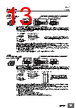
13 / 138 page  E5GC 13 Dimensions (Unit: mm) Controllers L1 40 min Mounted Separately Horizontally Group Mounted +1.0 +0 L1=(48×n-2.5) 45+0.6 0 22.2+0.3 0 22.2+0.3 0 n: Number of mounted Controllers (2 ≤ n ≤ 6) Terminal Cover (Accessory, E53-COV27 (also available for ordering separately)) Mounting Adapter (Accessory, Y92F-53 (also available for ordering separately)) Waterproof Packing (Accessory, Y92S-P12 (also available for ordering separately)) 22 22 24 63.6 48 4 1 90 40.8 44.8 E5GC- @6 Controllers with Screw Terminal Blocks • Use two Mounting Adapters, either on the top and bottom or on the right and left. • Setup Tool ports are provided as standard feature. Use these ports to connect a computer to the Digital Temperature Controller. The E58- CIFQ2 USB-Serial Conversion Cable is required to connect to the port on the side panel. The E58-CIFQ2 USB-Serial Conversion Cable and E58-CIFQ2-E Communications Conversion Cable are required to connect to the port on the bottom panel. (You cannot leave either port connected constantly during operation.) • To install the Temperature Controller, insert it into a square hole in a panel with a thickness of 1 to 8 mm, and then insert the enclosed adapter so that it locks into the grooves on the top and bottom or on the left and right of the rear case. • Tighten the two mounting screws on the top and bottom or on the right and left of the Mounting Adapters alternately little by little to main- tain a balance, and tighten them to a torque of between 0.29 and 0.39 N·m. • When two or more Temperature Controllers are mounted, make sure that the surrounding temperature does not exceed the allowable operating temperature range given below. Horizontal group mounting: −10 to 55°C • Use Temperature Controllers with Screwless Clamp Terminal Blocks for vertical group mounting. To mount the Temperature Controller so that it is waterproof, insert the Waterproof Packing onto the Temperature Controller. Group mounting does not allow waterproofing. Mounting Adapter (Accessory, Y92F-53 (also available for ordering separately)) Waterproof Packing (Accessory, Y92S-P12 (also available for ordering separately)) 22 22 24 63.6 48 493 40.8 44.8 1 L1 40 min +1.0 +0 L2=(24×n-1.5) 45 +0.6 +0 45+0.6 0 22.2+0.3 0 22.2+0.3 0 Mounted Separately Horizontally Group Mounted Vertically Group Mounted L2 +1.0 +0 L1=(48×n-2.5) n: Number of mounted Controllers (2 ≤ n ≤ 6) E5GC- @C Controllers with Screwless Clamp Terminal Blocks • Use two Mounting Adapters, either on the top and bottom or on the right and left. • Setup Tool ports are provided as standard feature. Use these ports to connect a computer to the Digital Temperature Controller. The E58- CIFQ2 USB-Serial Conversion Cable is required to connect to the port on the side panel. The E58-CIFQ2 USB-Serial Conversion Cable and E58-CIFQ2-E Communications Conversion Cable are required to connect to the port on the bottom panel. (You cannot leave either port connected constantly during operation.) • To install the Temperature Controller, insert it into a square hole in a panel with a thickness of 1 to 8 mm, and then insert the enclosed adapter so that it locks into the grooves on the top and bottom or on the left and right of the rear case. • Tighten the two mounting screws on the top and bottom or on the right and left of the Mounting Adapters alternately little by little to main- tain a balance, and tighten them to a torque of between 0.29 and 0.39 N·m. • When two or more Temperature Controllers are mounted, make sure that the surrounding temperature does not exceed the allowable operating temperature range given below. Horizontal group mounting: −10 to 55°C Vertical group mounting of two Controllers: −10 to 45°C Vertical group mounting of three or more Controllers: −10 to 40°C • If you use vertical group mounting, you cannot draw out the interior body of the Controller. To mount the Temperature Controller so that it is waterproof, insert the Waterproof Packing onto the Temperature Controller. Group mounting does not allow waterproof- ing. |
|
Lien URL |
| ALLDATASHEET vous a-t-il été utile ? [ DONATE ] |
À propos de Alldatasheet | Publicité | Contactez-nous | Politique de confidentialité | Lien vers la fiche technique | Echange de liens | Fabricants All Rights Reserved©Alldatasheet.com |
| Russian : Alldatasheetru.com | Korean : Alldatasheet.co.kr | Spanish : Alldatasheet.es | French : Alldatasheet.fr | Italian : Alldatasheetit.com Portuguese : Alldatasheetpt.com | Polish : Alldatasheet.pl | Vietnamese : Alldatasheet.vn Indian : Alldatasheet.in | Mexican : Alldatasheet.com.mx | British : Alldatasheet.co.uk | New Zealand : Alldatasheet.co.nz |
|
Family Site : ic2ic.com |
icmetro.com |
 French ▼
 English
 Chinese
 German
 Japanese
 Russian
 Korean
 Spanish
 French
 Italian
 Portuguese
 Polish
 Vietnamese
 Indian
 Mexican
 British
 New Zealand